-
Shop
- Adidas
- Advanced Technologies
- AI Skills Mastery 2026 Collection
- Astrology & Tarot Products
- Beauty
- Beauty Guides Collection
- Best-Sellers
- Car Accessories
- Confidence
- Dating & Social Skills
- Digital Resources
- AI & Technology
- AI Skills
- Budgeting & Saving
- Car Buying & Ownership
- Cozy Feast Collection
- Electronics & Technology
- Emotional Intelligence
- Entrepreneurship & Business Growth
- Financial Education
- Financial Independence
- Financial Mindset & Psychology
- Goal Setting
- Hobbies
- Home Styling & Organization
- Kitchen & Recipes
- Leadership
- Mindfulness
- Mindset
- Motivation
- Online Business
- Parenting & Child Development
- Pet Lifestyle & Wellness
- Positive Thinking
- Productivity
- Self Confidence
- Sleep Improvement
- Smart Life with AI
- Stress Management & Relaxation
- Travel Planning
- Yoga & Fitness
- Yoga & Mind-Body Practices
- Education & Learning
- Family & Parenting
- Fashion
- Alexander McQueen
- Bags
- Bags & Wallets
- Balenciaga
- Belts
- Blazers
- Bottega Veneta
- Brunello Cucinelli
- Burberry
- Chanel
- Chloé
- Dior
- Dolce & Gabbana
- Dresses
- Etro
- Fendi
- Gucci
- Hats & Hair Accessories
- Hoodies & Sweatshirts
- Jacquemus
- Jil Sander
- Keychains
- Kiton
- Luggage
- Miu Miu
- Off-White
- Outerwear
- Prada
- Rick Owens
- Saint Laurent
- Shoes
- Socks & Tights
- Sweaters & Cardigans
- The Row
- Tom Ford
- Tops & Shirts
- Valentino
- Valentino Garavani
- Versace
- Vivienne Westwood
- Watches
- Fashion Accessories
- Furniture
- Gadgets
- Health & Beauty
- Health & Wellness
- Home & Garden
- Home Supplies
- Jewelry
- Kids & Babies
- Kitchen
- Kitchen Best-Sellers
- Nike
- Patio, Lawn & Garden
- Personal Growth
- Personal Style & Fashion
- Pet Care
- Pet Supplies
- Pets
- Smart Home Living Guides
- Sport & Outdoors
- Stress Relief & Relaxation
- Super Deals
- TikTok Growth & Monetization Mastery
- Travel
- Travel & Adventure
- Wealth
- Wellness
- Popular
- Best deals
4K Portable Projector: Auto Focus, Android 11 & Bluetooth
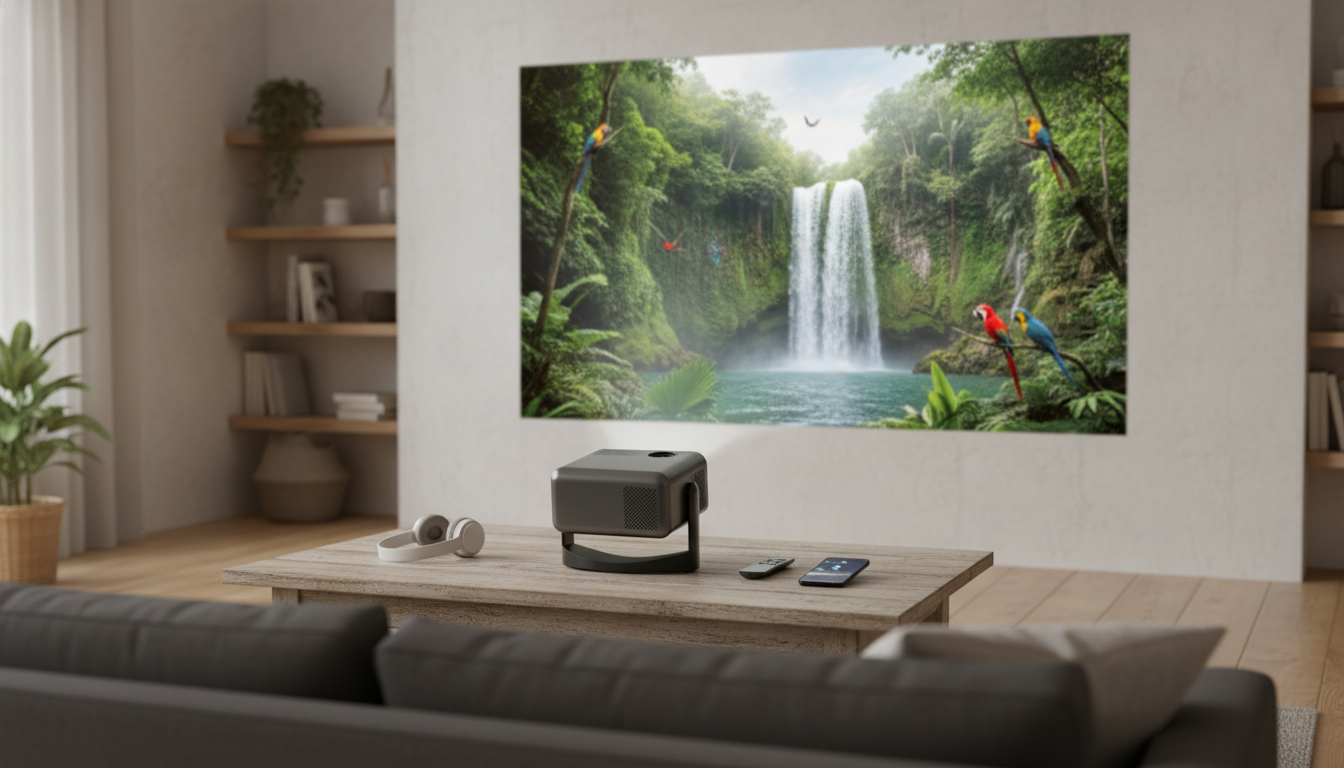
4K Portable Home Projector with Auto Focus, Bluetooth, Android 11 & 360° Cinema
A compact projector can turn a wall, ceiling, or screen into a flexible movie-and-gaming setup without a permanent installation. The right features make a portable model feel less like a “gadget” and more like a real home theater: dependable focus, easy alignment, practical audio options, and a smart interface that reduces extra boxes and cables. Below is a clear guide to what matters for image quality and placement, how auto focus and keystone simplify setup, how Bluetooth and Android 11 change everyday use, and what to check before buying for bedrooms, dorms, patios, and travel.
What makes a portable projector feel like a real home theater
“Cinema feel” comes from more than a big picture. Clarity depends on your source resolution, the projector’s optics, focus accuracy, and how well it handles scaling and compression from streaming services. A sharp lens with consistent focus across the image helps subtitles and UI text look crisp instead of hazy.
Brightness is just as situational. Perceived brightness depends on room lighting, wall color, and image size; the darker the room, the larger you can go while keeping contrast convincing. In a room with lamps or daylight, a slightly smaller image often looks more punchy and enjoyable than a giant, washed-out one.
Audio is the other half of the experience. If built-in speakers aren’t enough for dialogue clarity or impact, plan for a Bluetooth speaker, soundbar, or headphones. Finally, placement flexibility matters in real homes: tabletop, tripod, shelf, or bedside positioning should be quick to align so you can watch without turning setup into a project.
Auto focus and keystone: fast setup in real rooms
Portable projectors move around, which means focus is constantly changing. Auto focus is a practical feature that keeps text, menus, and subtitles sharp when you shift the projector from a bedroom to a living room, or from a table to a tripod. It also helps when you’re projecting at an angle for casual viewing.
Keystone correction is what makes the image look square when the projector can’t be perfectly centered. If you’re projecting from below a screen, from above on a shelf, or off to one side, keystone reduces the “trapezoid” effect. Still, it’s best to use minimal keystone when possible; physical alignment (moving the projector closer to center and level) usually preserves more sharpness than heavy digital correction.
If you want ceiling viewing or angled “360°” placement, confirm that focus and keystone remain reliable when the unit is tilted. A projector that’s easy to realign encourages more frequent use—especially in small spaces where the setup changes day to day.
Android 11 built in: streaming without extra boxes
For deeper reading on screens, setup considerations, and projector buying factors, helpful references include Projector Central’s screen guide and the ongoing testing and comparisons from RTINGS.
Bluetooth: pairing speakers, headphones, and practical audio tips
One practical caveat is audio delay. Bluetooth can introduce latency, especially with some speakers or headphone models. If you notice lips not matching dialogue, try enabling any “low latency” mode on your audio device, or switch to a wired connection if your setup supports it. Keeping the speaker close to the viewing area also helps you run lower volume while hearing clearer speech. For an overview of how Bluetooth audio works across devices, see the Bluetooth SIG’s Bluetooth audio explainer.
Choosing your screen size and placement
| Use case | Room light | Recommended approach | Audio plan |
|---|---|---|---|
| Bedroom movie nights | Low to medium | Medium image size, align near center, minimal keystone | Bluetooth speaker or headphones |
| Dorm or small apartment | Medium | Prioritize portability and fast focus; use a screen if walls are textured | Compact Bluetooth speaker |
| Backyard/patio | Low (after dark) | Bring a stand/tripod, avoid wind movement, plan power | Louder Bluetooth speaker |
| Gaming on the go | Low to medium | Keep image smaller for punchier brightness; reduce processing where possible | Wired or low-latency audio |
Key specs and features to confirm before buying
Product spotlight: 4K Portable Home Projector with Auto Focus, Bluetooth, Android 11 & 360° Cinema
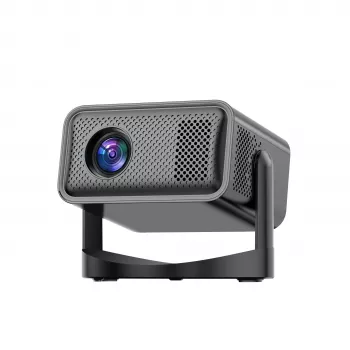
If the goal is a compact setup that’s easy to move and fast to dial in, the 4K Portable Home Projector with Auto Focus, Bluetooth, Android 11 & 360° Cinema is built around convenience features that matter in everyday use. Auto focus supports quick room-to-room changes, while keystone-style alignment tools help when placement can’t be perfectly centered.
To round out a cozy viewing space, consider lighting and comfort. A statement fixture like the Luxury Retro French Romantic Copper Crystal Wall Lamp can add warm ambient light (useful before and after a movie), while a comfortable basic like the Calvin Klein Jeans Light Blue Cotton T-shirt for Men fits right into relaxed, at-home movie nights.
Everyday use tips for a better picture
Care, travel, and longevity
FAQ
Does Android 11 mean streaming apps work without a separate device?
Often yes: built-in Android can run many streaming apps directly on the projector. App availability can vary, so an HDMI streaming stick is a simple fallback if a specific service isn’t supported.
Will Bluetooth audio be in sync with the video?
Bluetooth can introduce audio delay depending on the speaker/headphones. If sync is off, try a low-latency mode (if available) or use a wired audio connection when you need tighter timing.
How big of an image can a portable projector realistically handle?
It depends on brightness and how dark the room can get: darker rooms support larger, higher-contrast images, while rooms with ambient light usually look better with a smaller size. Wall or screen quality and your available throw distance also limit what’s practical.










Leave a comment